Retaliatory Returns
One of the key features of Stratus is its ability to perform retaliatory tax calculations for all applicable states. The software automatically calculates retaliatory taxes by flowing the values from the state of filing through the return for the state of domicile, then applying the domicile state’s tax rules to process the calculation.
Retaliatory returns are located directly beneath the filing return for each state in the navigation tree. The retaliatory return will display “(Retal)” after the return name, and the retaliatory worksheet will display “Retal” following the state of domicile.
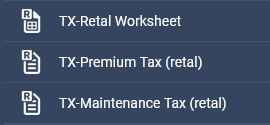
Retaliatory Worksheet vs. Foreign Return
Stratus provides two options for retaliatory supporting documentation. The first method uses the state of domicile's foreign return, and the second method utilizes a standard retaliatory worksheet. You may use either to support your retaliatory calculations.
The retaliatory worksheet has sections for premiums, deductions, taxes, fees, and credits. There are also lines to display excludable premiums when applicable, such as Medicare and Federal Employee Benefits and excludable lines 2.2 and 2.3, Multiple Peril Crop and Federal Flood.
Some of the states will accept the standard retaliatory worksheet as an alternative to the home state return. However, it is each company’s responsibility to determine what agreement, if any, has been made with the state officers pertaining to what types of submissions are acceptable and required for retaliatory calculations.
By default, both the retal returns and worksheets are displayed for each active jurisdiction.
Please note that the retaliatory return and worksheet will be hidden in situations in which they are not applicable, such as when returns are domiciled in HI or NY.
By choosing the Reciprocal States option in the Company Options, you may choose to hide/not print retaliatory returns for a state’s reciprocal states when your company’s current state of domicile is AZ, MA, MN, RI, NY, or HI, e.g., for a company domiciled in AZ, when the option is checked, the retaliatory returns for MA, MN, RI, NY, and HI will be hidden and won’t print with the return.
Adjusting the State of Domicile Side of Your Returns
There are two ways to adjust the state of domicile side of your filing returns:
- You may make the adjustment on the standard retaliatory worksheet. The numbers will then flow to your state of filing’s return.
- The second method is to make adjustments on the actual retaliatory return. The numbers will flow to the retaliatory worksheet and then to your state of filing’s return.
Note that if your State of Domicile side of your filing return allows only one field to display the tax rate, but has multiple tax rates, Premium Pro will leave the field blank. However, we will still calculate your state of domicile tax and insert the amount into the appropriate field.
Retaliatory Input Schedule
The Retaliatory Input Schedule is particularly useful for situations where you need to adjust retaliatory amounts for every state of filing. This schedule will only be present under the Company Information area for specific states of domicile that may require additional entries, such as other taxes, fees, and assessments, to aid in the processing of your retaliatory calculations. This schedule is customized for each state of domicile that it exists for based on items that may need to be included in retal calculations.